Article: Getting to Know the PurePath
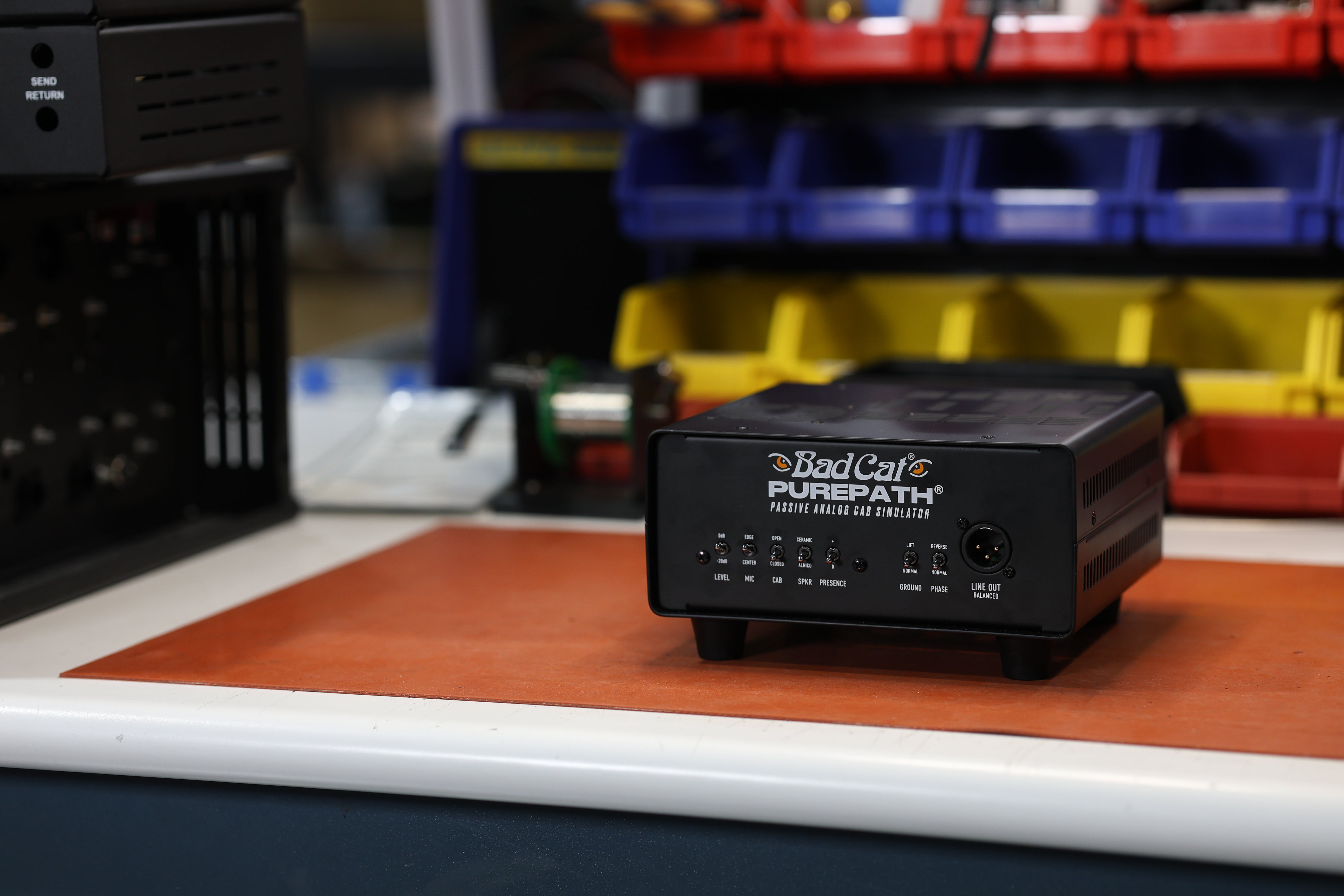
Getting to Know the PurePath
You just plugged in something different. No menus to scroll through, no power cable to hunt down, no presets to audition. Just your amp, a few switches, and tone that actually sounds like you.
PurePath is a new kind of tool — a fully analog speaker simulator with a mechanical reactive load, powered entirely by your amplifier. If you're used to IR loaders or digital solutions, the experience is going to feel noticeably more alive. That's the point.
Here's how to get the most out of it right from the start.
First: Get Connected
PurePath lives between your amp's speaker output and wherever you're going — a PA, an audio interface, a mixer. Here's the basic chain:
Amp speaker output → PurePath input → PurePath output → your destination (PA / interface / mixer)
If you want to keep a real cabinet in the loop alongside PurePath, use the extension cab output and set the load selector to EXT CAB. If you're going fully silent — no speaker at all — flip it to SILENT. That's it. Your amp is now driving a true mechanical load and sending a real analog signal downstream.
Start Here: A Recommended Starting Point
When you're dialing in for the first time, try this as your baseline before you start tweaking:
- LEVEL: 0 dB
- MIC: CENTER
- CAB: CLOSED
- SPKR: ALNICO
- PRESENCE: 0
- GROUND: NORMAL
- PHASE: NORMAL
This gives you a balanced, natural representation of your amp with a little warmth on top. From here, everything is additive — you're making small moves to shape your sound, not chasing something buried in a menu.
What Each Switch Actually Does
LEVEL — 0 dB / -20 dB This is your output pad. Start at 0 dB. If your interface or mixer input is clipping or distorting on the way in, flip to -20 dB to bring the level down to something manageable. It's not a tone control — it's a practical tool.
MIC — EDGE / CENTER Think of this as mic placement on an imaginary cabinet. CENTER is brighter and more present — great for cutting through a mix or when you want your pick attack to come forward. EDGE is smoother and rounder — ideal for rhythm playing, jazz, or anything where you want the highs to back off a bit.
CAB — OPEN / CLOSED This shapes the low end. CLOSED is tighter and punchier — it has more thump and feels more controlled. OPEN is looser and more airy, which can feel more natural with certain amps, especially lower-wattage ones. If your tone feels a little undefined in the bottom end, try CLOSED. If it feels stiff or constrained, try OPEN.
SPKR — CERAMIC / ALNICO This is the speaker character control, and it's one of the most fun switches to explore. CERAMIC leans into a more modern, aggressive tone — think the bite and grind of a Celestion V30-style response. ALNICO is sweeter and more vintage in character, with a softer top end and more bloom. Neither is right or wrong — it depends entirely on your amp and what you're going for.
PRESENCE — 0 / 1 A simple presence boost. If your tone is sitting in the mix but not quite cutting, flip to 1. If you're already bright and don't need more edge, leave it at 0.
GROUND — NORMAL / LIFT You probably won't need to touch this, but if you hear hum or a low buzz coming through the PA or interface, flip to LIFT. It breaks the ground loop and the noise should disappear.
PHASE — NORMAL / REVERSE This one matters most if you're blending PurePath with a mic'd cabinet simultaneously. If the combined sound feels hollow or thin — like some frequencies are canceling out — flip PHASE to REVERSE. When blending two sources, phase alignment makes all the difference.
A Few Scenarios Worth Knowing
Home recording with a loud amp: Set the load to SILENT, level to 0 dB (or -20 dB if needed), MIC to CENTER, CAB to CLOSED, SPKR to wherever your amp sounds best. You can push your amp as hard as it wants to go without waking anyone up — and you'll still get the feel of a cranked tube amp coming back through your headphones or monitors.
Live use into a PA: Same setup as above, but this time you're sending directly to front of house. PRESENCE at 1 can help you cut through a loud stage mix. Check with your sound engineer on level — start at 0 dB and pad down if needed.
Blending with a mic'd cab in the studio: Use the EXT CAB output to keep your cabinet in the circuit. Run PurePath to a second channel on your interface and blend to taste. If it sounds phase-y or thin combined, flip PHASE. This setup gives you a lot of tonal flexibility in the mix.
Pro Tip: Dial In Your Dirty Tones First
If you're switching between clean and dirty sounds in your rig, always dial in PurePath with your gain tones first. Driven and overdriven sounds emphasize certain frequencies more aggressively than clean tones do — so if you optimize for those first, your clean tones will naturally fall right into place. Go the other direction and you may find yourself chasing your tail trying to get both to sit right.
One Last Thing
PurePath rewards exploration. Every amp has its own personality, and the combination of your specific amp, your speaker character preference, and your destination will be unique to you. Spend some time with each switch and trust your ears — that's exactly how it was designed to be used.
Have questions? Reach us at support@badcatamps.com or give us a call at (714) 630-0101. We're always happy to talk tone.